What an assessment is
A hiring team can ask you to take a skills assessment for a role. Before you start, you see its purpose, how long it takes, what sections it has, and how the result will be used. You choose to take it or decline; declining is recorded plainly and is not a mark against you.
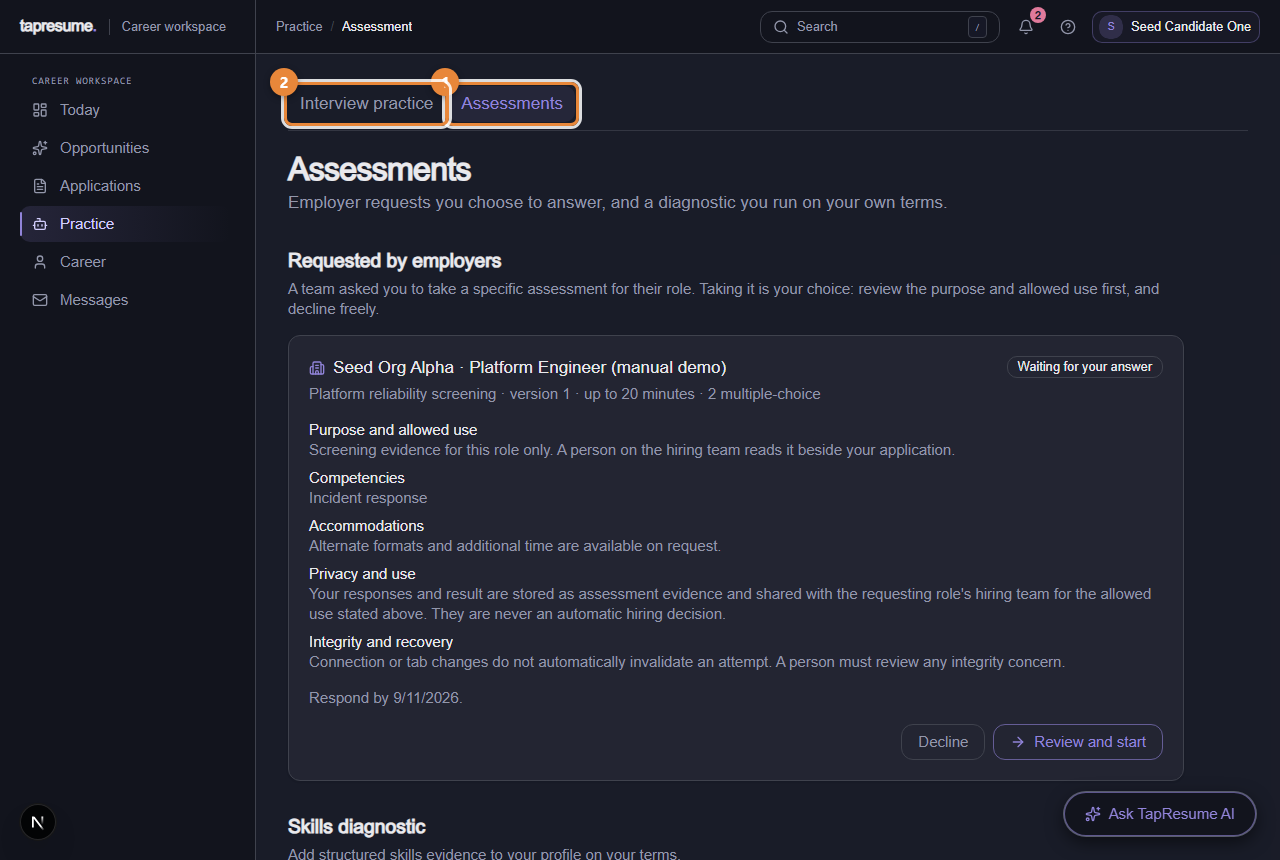
- Marker 1: Assessments tab under Practice
- Marker 2: Interview practice: rehearse before a real one
Steps
- Open Practice, then Assessments (marker 1). Requests waiting for you are at the top under Requested by employers, with the date to respond by.
- Read the card: purpose and allowed use, competencies, accommodations, privacy, and how long it takes.
- Click Review and start when you are ready and have the time in one sitting. Tick the consent box in Start this assessment? and click Start now.
- Answer each question. The timer is shown. If your connection drops, reopen the page: your answers are kept and you can resume.
- Click Submit answers on the last question. You cannot change answers after that.
The three pages that follow show each of these screens in detail.
What the hiring team sees
Your result, as evidence beside your application, never as a verdict. A person on the team reviews it. If anything about the attempt needs a second look, a person decides, and you are told if it affects your application.
Practise first
Interview practice (marker 2) lets you rehearse questions with no one watching and nothing recorded for employers.
Common questions
Can I take it on my phone? Yes, but a laptop is easier for coding sections.
I ran out of time. What you submitted counts. Tell the hiring team through Messages if something went wrong.