The emails
| Invitation | Reminder | |
|---|---|---|
| Subject | Video Introduction requested for the role | Reminder: Video Introduction for the role |
| Button | Review the request | Review the request |
The invitation names the organization and role, what they would like you to cover when they said so, the date to respond by when there is one, and the alternatives to video the role accepts. It says that choosing an alternative does not disadvantage your application, that you may decline, and that the hiring team, not automation, owns every hiring decision. The reminder is the same message, worded as still open.
What to do
- Click Review the request. It opens the introduction page for that role, with the purpose, time limit, who can watch, retention and deadline.
- Choose a format and record or write your introduction, or click Decline this request (see Record an introduction for a role).
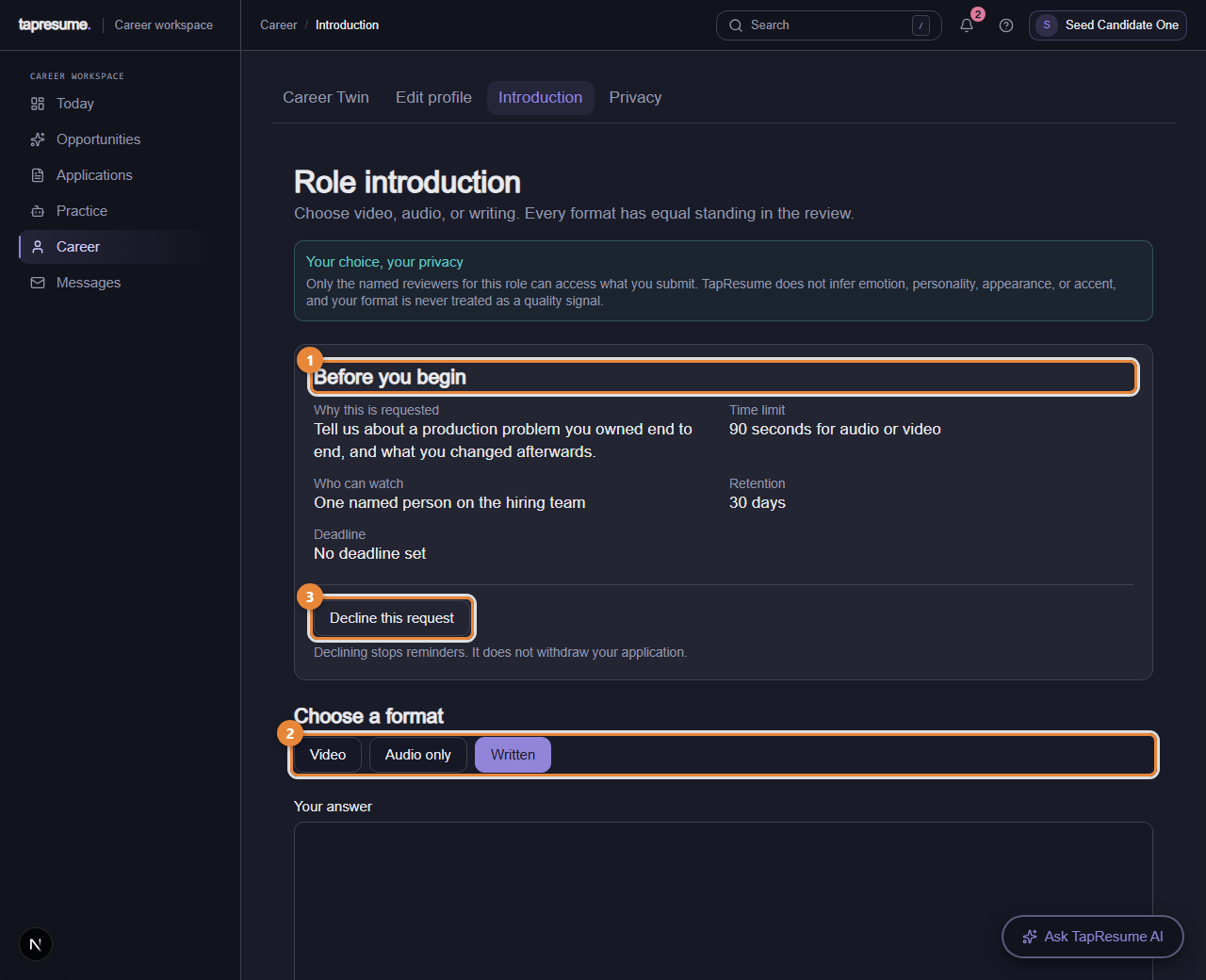
- Marker 1: Before you begin: purpose, time limit, who can watch, retention, deadline
- Marker 2: Choose a format: Video, Audio only, or Written
- Marker 3: Decline this request
What happens next
Only the named people on the hiring team can see your response, for the number of days shown under Retention. Declining stops reminders and does not withdraw your application.
Common questions
I cannot open the link because I am not signed in. Sign in with the address the email came to (see Sign in with a code or a password); the page then opens.
Can I change it after sending? Yes. Open the same page to replace it or delete it permanently.