The email
| Item | Detail |
|---|---|
| Subject | Interview Scheduling: followed by the interview title |
| From | The person on the hiring team who set it up, at their organization |
| Button | Pick a Time |
It says who would like to interview you and for which role, the location and notes when the team added them, and the proposed time slots, listed in the team's time zone. Under the button it says that if none of the times work you can say so through the same link.
What to do
- Click Pick a Time.
- Choose a slot, add a note if you like, and click Confirm this time; or click None of these times work (see Pick an interview time from the email link).
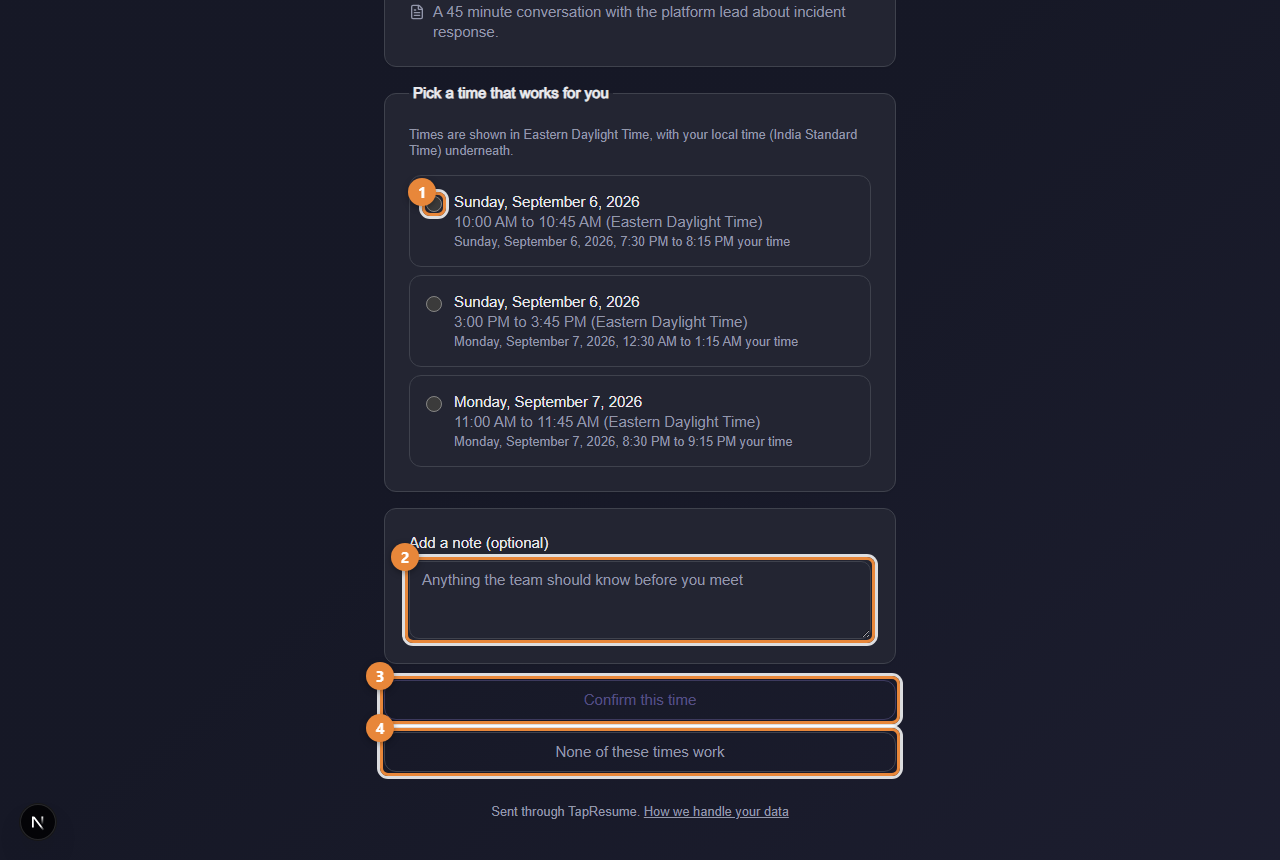
- Marker 1: A proposed time; pick one
- Marker 2: Add a note, optional
- Marker 3: Confirm this time
- Marker 4: None of these times work
What happens next
The team is told your answer at once. When you are signed in, a confirmed interview is listed under the role's process on its opportunity page. The link then shows the booked time and cannot be changed from the page.
Common questions
The times are in the wrong zone. The page shows the team's zone and, when your browser is elsewhere, your local time under each slot.
I answered and need to change it. Contact the hiring team through Messages.