Where the switches are
The grey footer of every TapResume account email has Manage email preferences and Unsubscribe. Both open a page called Privacy & Data, at /settings/privacy, after you sign in. It is a plain settings page outside the usual navigation; Back to Dashboard at the top returns you to the app.
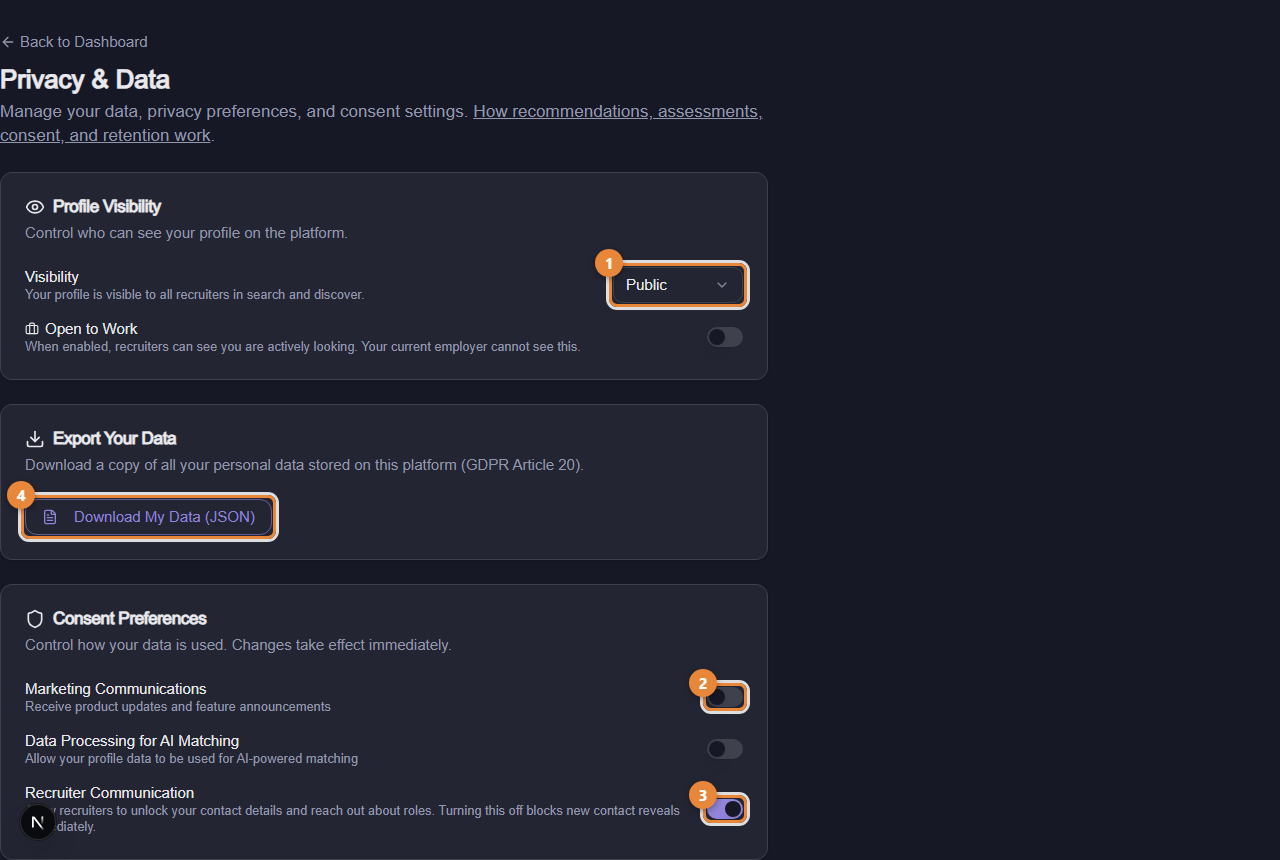
- Marker 1: Profile visibility: Public or Private
- Marker 2: Marketing communications switch
- Marker 3: Recruiter communication switch
- Marker 4: Download My Data (JSON)
What is on the page
- Profile Visibility: the Visibility selector (marker 1) is Public, visible to all recruiters in search and discover, or Private. The Open to Work switch tells recruiters you are actively looking; your current employer cannot see it.
- Export Your Data: Download My Data (JSON) (marker 4) gives you a copy of everything held about you.
- Consent Preferences: three switches, and each change takes effect immediately. Marketing Communications (marker 2) covers product updates and feature announcements. Data Processing for AI Matching allows your profile to be used for matching. Recruiter Communication (marker 3) allows recruiters to unlock your contact details and reach out about roles; turning it off blocks new contact reveals at once. Turning a switch off withdraws that consent, and the change is recorded with the date.
- Access History: every time an organization revealed your contact details or downloaded your resume, with the reason they gave.
- Request History: your past export and deletion requests.
- Delete Account: Request Account Deletion, then Confirm Deletion Request. There is a grace period during which Cancel Request undoes it; after it, the deletion cannot be undone.
Three ways to stop email
| You want to stop | Do this |
|---|---|
| One organization's reminders and invitations | Click the one-click link at the bottom of their email (see The unsubscribe links, and what each one stops) |
| Marketing email, or contact from recruiters | Turn off Marketing Communications or Recruiter Communication here |
| An organization seeing your profile at all | Privacy in the left navigation, then stop sharing with that organization |
Application updates, sign-in codes, and receipts for things you did are about your own actions and keep arriving while your account exists.
Common questions
I turned off Recruiter Communication. Can a team still see my application? Yes. The switch stops new contact reveals and outreach; it does not hide the application you made.
Where is Privacy in the left navigation different from this page? The Privacy page shows what each employer can see, discovery, who accessed your data, and export or delete, per organization. This page holds the account-wide switches and is where the email footer leads.